Jon Bergmann & Aaron Sams (pioneers of the flipped classroom) recently teamed up with Edutopia to create the Flipped Learning Toolkit. This is an excellent collection of videos and articles designed for both those new to Flipped Learning as well as more experienced educators and administrators.
If you are interested in Flipped Learning and would like to sharing the concept with other educators and stakeholders in your community, I highly suggest checking out this series.
Click here to see the entire collection on Edutopia.
The 6 videos in this series can also be viewed below:
Rethinking Space & Time
Overcoming Common Hurdles
Is Flipping For Everyone?
Formative Assessment
Which Tech Tools Are Right For You?
Getting Stakeholders On Board
Thursday, April 2, 2015
Sunday, March 29, 2015
Mastery Learning Research & Case Studies
Since many of you may be considering a shift towards mastery learning and/or standards-based grading in the future, I am sharing out our Google Drive folder containing research and resources. We will be adding more that we find pertinent and useful over the next several months.
Click here to view the "Mastery Learning / SBG Resource Folder"
*** If you come across any other research and resources that you think would be helpful, please share and it will be added to the collection!
Friday, March 20, 2015
Student Progress Monitoring With Google Doc Portfolios
Through my research and classroom experience, I've realized how critical progress monitoring is for students, particularly when they are engaged in mastery learning. When I first attempted to tackle progress monitoring, it was focused more on the daily routine and classroom management. This year I have realized that students need a more robust and consistent form of progress monitoring if they are to effectively gauge their skill level and track their progression through the course.
I have actually chosen a rather simple way to have students do this: a Google doc.
Yes, there are digital portfolio platforms and standards-based grading software, but for our purposes, a simple Google Doc helps students set goals, organize their evidence, track progress and reflect upon their learning experiences.
Here is the format for the students' portfolios:
-----------------------------------------------------------------------------
Standard # __ : [Insert standard description here...]
Evidence: [Link / describe evidence of proficiency here...]
Reflection: [What was difficult? What was easy? What learning strategies did you use? What goals will you set moving forward? What feedback do you have for Mr. Driscoll?]
-----------------------------------------------------------------------------
Below you can see a screenshot from one student's portfolio:
Another advantage of this is that I can easily access each student's portfolio document through a spreadsheet (via form submission - see screenshot to the right) and provide them with commentary and feedback throughout the semester. This has particularly helped when students start to fall behind. For example, we just had parent-teacher conferences and I was able to go through each student's portfolio with parents to discuss progress (or lack thereof) and discuss strategies to help get them back on track.
Although this has been a very helpful way for students to organize their evidence and track their progress, I need to rethink how we should approach each unit reflection. Results on this front have been less than stellar, more on that next week...
I have actually chosen a rather simple way to have students do this: a Google doc.
Yes, there are digital portfolio platforms and standards-based grading software, but for our purposes, a simple Google Doc helps students set goals, organize their evidence, track progress and reflect upon their learning experiences.
Here is the format for the students' portfolios:
-----------------------------------------------------------------------------
Standard # __ : [Insert standard description here...]
Evidence: [Link / describe evidence of proficiency here...]
Reflection: [What was difficult? What was easy? What learning strategies did you use? What goals will you set moving forward? What feedback do you have for Mr. Driscoll?]
-----------------------------------------------------------------------------
Another advantage of this is that I can easily access each student's portfolio document through a spreadsheet (via form submission - see screenshot to the right) and provide them with commentary and feedback throughout the semester. This has particularly helped when students start to fall behind. For example, we just had parent-teacher conferences and I was able to go through each student's portfolio with parents to discuss progress (or lack thereof) and discuss strategies to help get them back on track.
Although this has been a very helpful way for students to organize their evidence and track their progress, I need to rethink how we should approach each unit reflection. Results on this front have been less than stellar, more on that next week...
Friday, March 13, 2015
Flipped Mastery Presentation from #HIBLC15
Last Saturday marked the Highlander Institute's 4th Annual Blended Learning Conference in Providence, RI. At the conference, I had the opportunity to lead a session on "Flipped Mastery." Embedded below (and linked here) is the slide deck from my presentation.
Flipped Learning Network (Professional Learning Community)
Flipped Social Studies Community Doc
FLIPPED LEARNING RESEARCH
Flipped Learning Network Research Page
Flipped Learning Literature Review
Flipped Learning & Democratic Education (Columbia University MA Research 12/2012
FLIPPING SOCIAL STUDIES ARTICLES
Empowering Students Through Flipped Learning (SmartBlog on Education 1/2014)
Not Just Flipped (EdTech Digest (12/2013)
Flipping Social Studies (CUE Blog 10/2013)
I also curated a list of resources for participants about Mastery and Flipped Learning which can be accessed below or at bit.ly/masteryresources. Feel free to share these resources with anyone you think may be interested. And as always, contact me with any questions you may have about flipping or mastery (competency-based) learning!
VIDEOS
Flipped-Mastery Classroom
Quick Guide to Flipping Your Class
6 Inspiring Videos About Flipped Learning
Student Perspectives on Mastery Learning
Mastery Learning in Action (BETTER LESSON)
Flipped Mastery in Social Studies
ARTICLES
In Flipped Classrooms, a Method for Mastery (New York Times 10/2013)
New Hampshire’s Journey Towards Competency-Based Education
Making Mastery Work: Executive Summary (Nellie Mae Education Foundation)
Advice for School Principals on Implementing Competency Education
5 Myths About Mastery-Based Learning (Newton)
Blending Toward Competency (Christensen Institute)
Our Transition to Standards-based Grading (Essex Middle School, NH)
What is Flipped Learning? (Flipped Learning Network)
FLIPPED & MASTERY LEARNING BOOKS
Flip Your Class: Reach Every Student in Every Class Every Day
Flipping 2.0: Practical Strategies for Flipping Your Class
Flipped Learning: Gateway to Student Engagement
Formative Assessment & Standards Based Grading
COMMUNITIES
FLIPPED MASTERY RESOURCES
VIDEOS
Flipped-Mastery Classroom
Quick Guide to Flipping Your Class
6 Inspiring Videos About Flipped Learning
Student Perspectives on Mastery Learning
Mastery Learning in Action (BETTER LESSON)
Flipped Mastery in Social Studies
ARTICLES
In Flipped Classrooms, a Method for Mastery (New York Times 10/2013)
New Hampshire’s Journey Towards Competency-Based Education
Making Mastery Work: Executive Summary (Nellie Mae Education Foundation)
Advice for School Principals on Implementing Competency Education
5 Myths About Mastery-Based Learning (Newton)
Blending Toward Competency (Christensen Institute)
Our Transition to Standards-based Grading (Essex Middle School, NH)
What is Flipped Learning? (Flipped Learning Network)
FLIPPED & MASTERY LEARNING BOOKS
Flip Your Class: Reach Every Student in Every Class Every Day
Flipping 2.0: Practical Strategies for Flipping Your Class
Flipped Learning: Gateway to Student Engagement
Formative Assessment & Standards Based Grading
CREATING INSTRUCTIONAL VIDEOS
Creating Instructional Videos Guide
Video Samples From Various Grade-Levels / Disciplines
Flipped History Videos (Tom’s YouTube Channel)
How to Watch Instructional Videos (Tutorial for Students by PHS Social Studies Dept.)
Screencast-O-Matic Tutorial: Screenshot Version (Doc) / Video Version
Snagit Chrome App Tutorial: Snagit Chrome App Walk-Through
Go-To Screencasting Options By Device
Creating Instructional Videos Guide
Video Samples From Various Grade-Levels / Disciplines
Flipped History Videos (Tom’s YouTube Channel)
How to Watch Instructional Videos (Tutorial for Students by PHS Social Studies Dept.)
Screencast-O-Matic Tutorial: Screenshot Version (Doc) / Video Version
Snagit Chrome App Tutorial: Snagit Chrome App Walk-Through
Go-To Screencasting Options By Device
Flipped Learning Network (Professional Learning Community)
Flipped Social Studies Community Doc
FLIPPED LEARNING RESEARCH
Flipped Learning Network Research Page
Flipped Learning Literature Review
Flipped Learning & Democratic Education (Columbia University MA Research 12/2012
FLIPPING SOCIAL STUDIES ARTICLES
Empowering Students Through Flipped Learning (SmartBlog on Education 1/2014)
Not Just Flipped (EdTech Digest (12/2013)
Flipping Social Studies (CUE Blog 10/2013)
Wednesday, March 11, 2015
Bringing the World of ESPN to Our Students
The following is a guest post by Mat Barker, a social studies teacher, graduate tutor and intervention manager from Garfield Heights, Ohio.
| Contributing Author Mat Barker |
When I was in school, technology was just beginning to emerge to the forefront of the classroom. I remember the early days of teachers using technology, which usually consisted of PowerPoint presentations that were little more than duplicates of old 8mm slides. It was always one of two scenarios, A) the slides consisted of plain white backgrounds with monochromatic, Times New Roman type or B) It was a trip to the clipart jamboree with millions of cheesy PrintShop Deluxe images and more colors than a box of Lucky Charms. Thankfully, as teachers today, we have so many more options and design elements available to us.
During my time as a graduation tutor, I was often confronted with unmotivated, uninterested students. As a result, I am always looking for new and different ways to reach students, and that is what brought me to the flipped classroom model. After reviewing some of the videos and presentations by Tom Driscoll, I decided to begin to build a framework for my own flipped classroom.
Reaching Students on a Familiar Medium
I have always considered myself a visual learner and someone who cares as much about the presentation as I do the content. In college, I was even a graphic design major before switching to education. That being said, I decided to expand upon a presentation idea I saw on one of Tom’s videos. I was really attracted to the preview bar on the bottom of the screen and how it mimicked similar bars on sports networks like ESPN. As you can see in the images below, I expanded on Tom’s premise and mimicked the ‘Pardon the Interruption’ (PTI) graphics format.
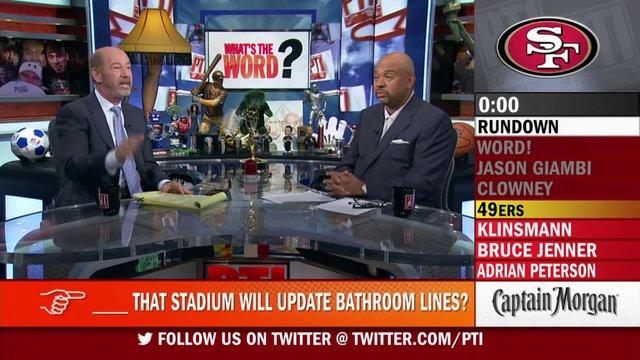
| ESPN's Pardon the Interruption |
| Mat's PTI-Style Presentation |
The reason? I wanted to foster a greater connection with kids and develop a layout that would resonate with them. My students love ESPN and Sports Center. It is something that they watch every day. My hope is that I can attract students to the content through the presentation. The format is comfortable; it is something they are familiar with.
How Is It Done?
If you are interested in creating a similar presentation you will need to play around with the shapes tool within Google Slides (Insert>Shape). After you create the desired shapes, you can then go to Pixlr Editor and use the Gradient Tool to create images that fade from one color to another. Once you do so, you have the choice of saving your image to your Google Drive or hard drive. Just insert the images into your presentation and resize as needed.
A few design notes:
- I did create the blue box above the rundown as a space to insert a video, similar to Tom’s presentations.
- If you are trying to truly mimic the PTI graphics, be sure to shadow the previously shown topics. You can easily do that through changing the shape and text color to a darker hue.
In closing, I would encourage you to have fun with your presentations. I often include humor in my slides to keep kids laughing and help ease the relationship between student and teacher. Also, don’t feel as though you have to take every presentation to this level. Sometimes just adding more thought into the graphic elements and not simply going with the same prefab template will really help kids to sit up and take notice.
Links to other presentations:
Big Ideas in Government – My take on the PTI presentation.
March World Madness – A concept design which is an expansion on the AP Euro Madness presentation.
Barker's Sketch History – A link to some visual handouts I made during my time as a social studies tutor.
About the Contributing Author:

About the Contributing Author:
Twitter: @CoachBarker33
School: Garfield Heights High School, Garfield Heights, OH
Position: Intervention Manager – Graduation Tutor – Social Studies Teacher
Subscribe to:
Posts (Atom)